Instrumentive User Guide
Setting and Tracking Goals
Goals turn vague intentions (“I should practice more”) into concrete targets you can actually measure. Instrumentive supports two types of goals: manual goals for open-ended objectives and time-based goals for building consistent habits.
Creating a goal
- Open the Goals tab and tap + to add a goal.
- Enter a descriptive Title and choose Manual or Time based.
- Configure the goal using the steps below for your chosen type.
Once you have created a goal, you can choose which pieces or exercises it tracks: open the goal, tap Track specific songs, and select the items you want to include. For a time-based goal, use this to limit which practice counts towards the target.
Manual goals
A manual goal is for any objective that isn’t purely about clocking hours — learning a new piece, preparing for an exam, memorising a concerto, or mastering a tricky passage.
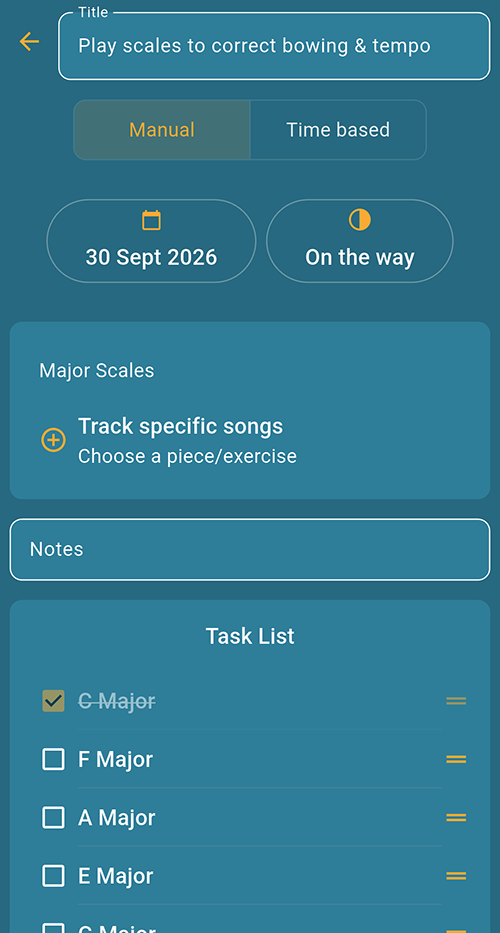
How manual goals work
- Enter a descriptive Title, such as “Prepare the prelude for my lesson”, and select Manual.
- Tap the date control to set a deadline if you want one.
- Tap Track specific songs and choose the pieces or exercises connected to the goal.
- Add any reminders or details in Notes. Use the Task List to break the goal into specific steps, such as learning a section hands separately or playing it at performance tempo.
- As you make progress, reopen the goal to tick off tasks and tap the progress control (shown as On the way in the screenshot) to update its stage.
Manual goals appear in the Goals tab where you can review your progress at a glance.
Time-based goals
A time-based goal tracks practice quantity — either time spent or number of sessions over a period.
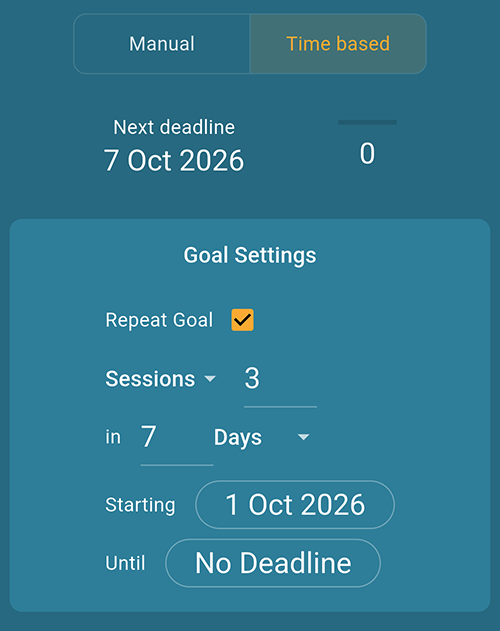
Setting a time-based goal
- Enter a descriptive Title and select Time based.
- Under Goal Settings, choose whether to count sessions or practice time, then enter your target amount.
- Set the length of the period using the number and unit controls. For example, the screenshot shows a target of 3 sessions in 7 days.
- Set the Starting date. Use Until to set an end date, or leave it as No Deadline.
- Tick Repeat Goal if you want the target to repeat for each new period.
Automatic progress tracking
Instrumentive calculates your progress automatically from logged sessions. You don’t need to manually update anything — just practice and the app does the maths.
Goal history
For repeating goals, Instrumentive keeps a history of each period so you can see whether you hit your target last week, last month, and beyond. This makes it easy to spot trends and stay accountable.
Weekly practice target
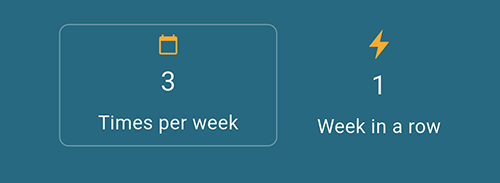
On the home screen you can set a weekly practice target — a simple goal for how many sessions (or how much time) you want to put in each week. The app tracks your progress and shows your current streak — the number of consecutive weeks you have hit your target.
A practical approach to goals
If you are new to goal-setting, start simple: create one repeating time-based goal — something like “practice 4 times this week”. Once that habit is established and you are consistently hitting the target, add manual goals for specific repertoire milestones or skill objectives. The key is to set goals that are challenging but achievable — a goal you never hit is discouraging, and a goal you always hit without effort isn’t pushing you forward.