Instrumentive User Guide
Session Templates
If you tend to practice the same set of items regularly, templates save you from setting up your session from scratch every time.
What templates are
A template is a pre-built list of activities — pieces, exercises, or anything else — that you can import into a session with a single tap. Think of a template as a practice plan that you can reuse.
Building a structured routine
Templates are one of the most powerful features in Instrumentive. They let you design a structured routine and follow it consistently. For example, you might create:
- A warm-up template — scales, arpeggios, and a technical exercise
- A repertoire template — the pieces you are currently learning
- A lesson prep template — everything your teacher has assigned this week
Having a plan before you sit down removes the “what should I practice?” decision and helps you use your time more effectively. You can always deviate from the plan — but starting with one means you’re less likely to skip the things you find difficult.
Creating a template
- Go to the Practice Sessions tab and tap
 .
. - Give your template a name (e.g. “Morning warm-up” or “Recital programme”).
- Add the pieces and exercises you want to include.
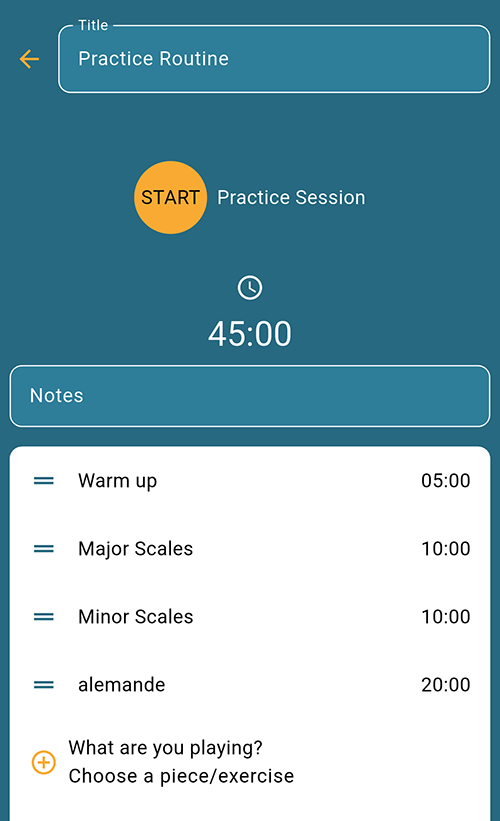
- Optionally set a time target for each activity — for example, 10 minutes of scales, 20 minutes on a sonata.
- Reorder the activities by dragging them into the sequence you want to follow.
Using a template in a session
- Start a new practice session, or open the session you want to add activities to.
- On the session details screen, tap Import a template.
- Select the template you want to use to add its activities to the session.
- Open an activity and start its timer when you are ready to practice.
You are still free to add, remove, or reorder activities after importing — the template is a starting point.
You can also start a session directly from a template: open the template and tap START Practice Session, as shown in the screenshot above.
Favouriting templates
Mark your most-used templates as favourites so they appear at the top of the list for quick access.