A music practice app by Stonekick
Instrumentive
Make time for better practice.
Track your practice, record your playing and see your progress over time. Instrumentive brings your practice history, notes and goals together.
Already use Instrumentive? Open the web app
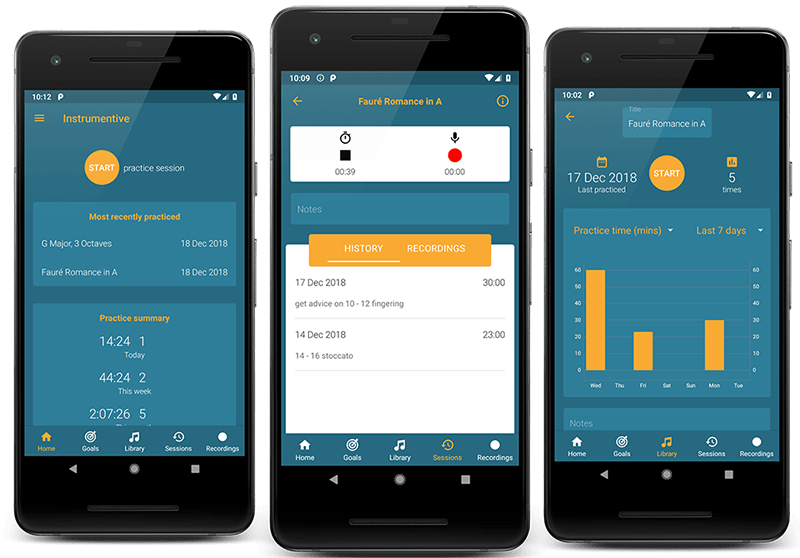
See your progress
Keep a record of what you practise and see how your routine develops.
Hear the difference
Listen back to your recordings and follow your progress over time.
Build a routine
Give your practice direction with notes and goals for your playing.
How to start a music practice journal
- Add the pieces or exercises you are working on to Instrumentive.
- Start a practice session and track the time you spend on each item.
- Add a note about what you worked on and record a short sample of your playing.
- Review your practice history to decide what to work on next.
Supported platforms
Available for Android and iOS, with a web app at my.instrumentive.com for accessing your practice account in a browser.
Free and paid features
Instrumentive offers a 30-day free trial so you can try its practice tracking tools.
A monthly subscription is required to continue after the trial. See the app store for the current price and trial terms. If your trial starts a subscription, cancel before it ends to avoid being charged. Read the Instrumentive terms of service for subscription details.
Instrumentive FAQs
Can I use Instrumentive with more than one instrument?
Yes. Organise your practice around the pieces and exercises you play. The quick start guide explains how to set up your practice library.
Where can I manage my subscription?
Open Account in the app menu and follow the link to the Google Play or Apple App Store account used to subscribe. Read the terms of service for subscription details.
Guides and further reading
Help and documentation
More for your practice
Metronome Beats helps you keep time and build speed.
Pitched Tuner helps you tune your instrument before you play.